October 13, 2026
Cairo airport and beyond: landing in Egypt with your eSIM already working
What Cairo, Luxor, Marsa Alam, Aswan, Alexandria and Sphinx airports offer on arrival, the SIM rules, and how to land with a travel eSIM already working.
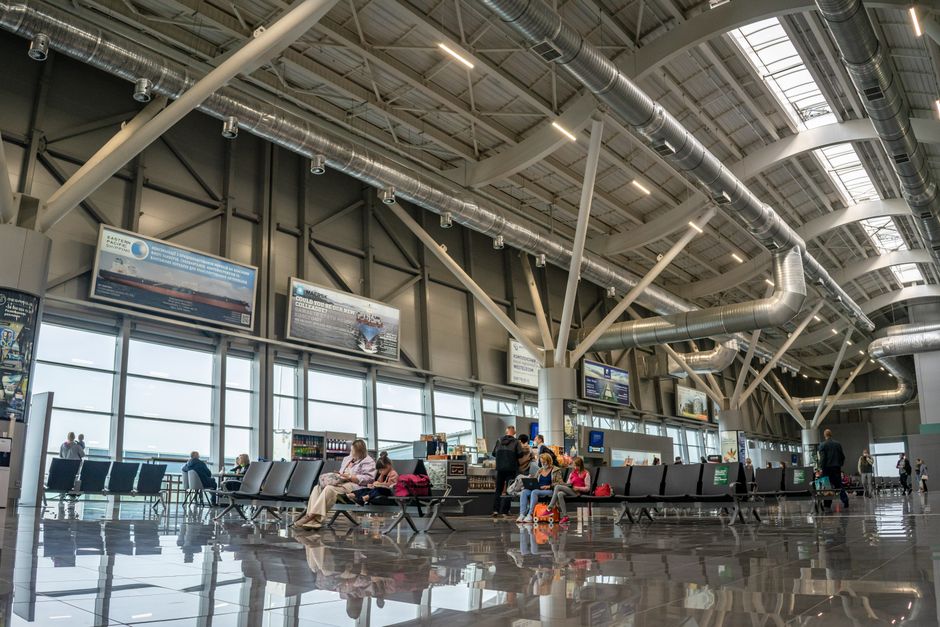
Photo: Atlantic Ambience — Pexels
Part of our Egypt eSIM guide: all articles and key facts →
An eSIM for Egypt, installed before you fly, puts your phone online as soon as you switch it on at the airport, whether you land in Cairo, Luxor, Marsa Alam or Aswan. The alternative is airport Wi-Fi that may ask for a local number, or a SIM counter that asks for your passport. This guide sets out what each Egyptian airport offers on arrival, according to the sources we could find, and how to make sure your eSIM connects on landing.
Key takeaways
- Cairo airport's free "CAI Free WiFi" asks for a code sent by SMS, and Sleeping in Airports, updated on 14 January 2026, says SIM cards are sold in the arrivals baggage halls; we found no published Wi-Fi or SIM counter information for Aswan, Alexandria (formerly Borg El Arab) or Sphinx airports.
- Egypt's regulator NTRA requires a foreigner buying a SIM to show an original passport and a residency document in person, while Vodafone Egypt sells its eSIM (350 EGP for a new line) only in its stores and eShop, so apart from your home operator's roaming, a travel eSIM installed at home is the way to have data the moment the plane lands without a counter.
- On 13 October 2026, 7 days cost €29.50 at Airalo, €33 at eSIM Égypte and €33.90 at Holafly, all above the esimdb median of €24.83 for 7-day Egypt plans; for 1 day, eSIM Égypte charged €6.50 and Holafly €6.90, while the 355 Egypt-only 1-day plans with at least 1 GB listed on esimdb that day had a median of €5.09.
Why land in Egypt with an eSIM already installed?
Because every other way of getting online at an Egyptian airport depends on something you cannot control from home. Airport Wi-Fi in Cairo asks for a code sent by text message. SIM counters, where they exist, need your original passport and a queue. At the smaller airports, we found no reliable description of either.
The first hour after landing is also when many travellers need data: you may need it to find your transfer driver, open a ride-hailing app, show a hotel booking or tell someone you have arrived. A travel eSIM bought and installed at home does all of that without a counter, a form or Egyptian pounds.
The one thing an eSIM cannot do is install itself without internet. Apple's support page on using an eSIM while travelling says the iPhone "must be connected to a Wi-Fi network or hotspot" to set one up, with an exception for eSIM-only iPhones in some countries. That is the reason to install it at home, on your own Wi-Fi, rather than in the arrivals hall.
Can you get online at Cairo airport?
Yes, through free Wi-Fi that needs an SMS code, or through a SIM bought in the baggage hall, but a travel eSIM avoids both. Cairo International Airport is Egypt's main gateway: it handled 31,137,557 passengers in 2025, the most in Africa on the list compiled by Wikipedia. It sits in Heliopolis, around fifteen kilometres from the city's business district.
Terminals
According to Wikipedia, Cairo has three passenger terminals in use, plus a Seasonal Flights Terminal used mainly during the pilgrimage seasons. Terminal 3, opened in 2009, is the largest and the main hub of EgyptAir and its alliance partners; it is linked to Terminal 2 by a bridge. Terminal 1 is the oldest, and a shuttle bus connects Terminals 1, 2 and 3. A fourth terminal is still a project.
The terminal matters for one reason: you cannot easily walk from one to another to look for a counter or a better Wi-Fi signal. Plan to be connected wherever your flight arrives.
CAI Free WiFi
The Sleeping in Airports guide to Cairo, last updated on 14 January 2026, names the network "CAI Free WiFi" and says that registration requires an SMS verification code. A reader reported in April 2025 that a foreign number works if typed with 00 before the country code, but the guide also warns that foreign travellers "may be unable to connect without a local SIM card". Neither statement is confirmed by the airport.
If you count on this Wi-Fi as a fallback, keep your home line able to receive text messages. Your home operator may charge for roaming, so check its rules first in our guide to roaming charges before travelling.
SIM counters and Vodafone's airport store
The same guide says that "SIM cards are sold in the arrivals baggage halls", from major local providers, and that availability and pricing may change. It does not say which operators, in which terminal or at what hours. More precise descriptions exist online, down to which baggage belt each counter faces, but the ones we found come from companies selling SIM or eSIM plans, and we do not repeat them.
Among the operators' official tourist pages we read on 1 October and 13 October 2026, only Vodafone's mentions an airport. Its Tourist Line page says the tourist SIM, called TourSIM, is sold at the "Vodafone airport store" or in any Vodafone retail store, and that it is reserved for tourists. It does not name the airport, publish a price or mention eSIM.
Can you get a Vodafone eSIM at Cairo airport?
Not according to anything Vodafone publishes. Its eSIM page says an eSIM can be bought "through any of our stores or through our eShop", at 350 EGP for a new line or 300 EGP to convert an existing physical SIM. It does not mention tourists, passports or airports. Our guide to Vodafone, Orange, e& and WE eSIMs for tourists covers what the four operators actually sell to visitors.
What does each Egyptian airport offer on arrival?
Only Cairo and Hurghada have a recent, specific description of SIM sales in arrivals; for the others, we found little or nothing. The table sums up what the sources say. It was checked on 13 October 2026; "no source found" means exactly that, not that the service is missing.
| Airport | Passengers in 2025 | Free Wi-Fi, per the sources | SIM sales in arrivals, per the sources |
|---|---|---|---|
| Cairo (CAI) | 31,137,557 | Yes, "CAI Free WiFi", SMS code | Yes, in the baggage halls |
| Hurghada (HRG) | 11,425,529 | Yes, unlimited | Yes, four operators, after baggage claim |
| Sharm el-Sheikh (SSH) | 9,046,690 | 15 minutes, foreign number may fail (2024 report) | No reliable source found |
| Marsa Alam (RMF) | 2,817,308 | Reported in lounges only | No source found |
| Luxor (LXR) | Not listed | "Reportedly free", unconfirmed | No source found |
| Aswan (ASW) | Not listed | No source found | No source found |
| Alexandria, formerly Borg El Arab (ALY, ex-HBE) | Not listed | No source found | No source found |
| Sphinx, Giza (SPX) | Not listed | No source found | No source found |
Passenger figures come from the Wikipedia list of Africa's busiest airports, which includes only four Egyptian airports for 2025. Wi-Fi and SIM details come from Sleeping in Airports, apart from Hurghada's counters, which are described by a local guide. They are traveller-reported guides, not statements by the airports.
Luxor and Aswan airports: what to expect
Expect to rely on your own eSIM: neither airport has a published, confirmed description of Wi-Fi or SIM sales. Luxor International Airport lies about 6 km east of the city, according to Wikipedia, with 48 check-in desks, 8 gates and 5 baggage belts. Charter flights bring many of its visitors, drawn by the Nile and the Valley of the Kings.
The Sleeping in Airports guide to Luxor, updated on 12 March 2026, describes Wi-Fi as "reportedly free" on the word of a reader, and has no information on SIM cards: it notes that a reader asked where to buy one. It also says it cannot confirm the airport's opening hours.
Aswan International Airport is 16 km southwest of the city. Wikipedia describes it as mainly domestic despite its name, with flights to Cairo and to Abu Simbel. We found no traveller guide describing its Wi-Fi or SIM sales. If you fly in from Cairo, your eSIM will already be connected; the timing question that raises is covered below.
Marsa Alam airport: the long transfer
At Marsa Alam, Wi-Fi is reported only in the lounges, so working mobile data matters for the transfer. Marsa Alam International Airport handled 2,817,308 passengers in 2025, according to the Wikipedia list. Wikipedia places it 60 km north of Marsa Alam, and it is run by the Kuwaiti M.A. Al-Kharafi Group.
The Sleeping in Airports guide to Marsa Alam, updated on 13 March 2026, says Wi-Fi is "reportedly available inside the airport lounges" and could not confirm it elsewhere in the terminal. Like the Luxor guide, it has no information on SIM cards yet.
With the airport that far from town, a message to your transfer company or hotel is the first thing many visitors need. Download offline maps of the coast before you fly, and keep the transfer details as a screenshot in case the signal drops on the desert road.
Alexandria (Borg El Arab) and Sphinx airports
Both airports serve big cities but have no published description of SIM counters or Wi-Fi that we could find. Alexandria's airport, still widely known as Borg El Arab International Airport, was renamed Alexandria International Airport on 4 September 2025 and now uses the code ALY, according to Wikipedia. It lies about 40 km southwest of the city, in Borg El Arab. It took over the flights of Alexandria's old El Nouzha airport, closed in 2012, and airlines moved into its new Terminal 2 on 1 January 2025.
Sphinx International Airport serves Giza and the western side of Greater Cairo, on the Cairo–Alexandria desert road. Wikipedia says its expansion was planned partly for traffic to the Grand Egyptian Museum, and lists low-cost and Gulf airlines such as easyJet, Wizz Air, Pegasus and flydubai among its carriers.
Where no source describes a counter or a working Wi-Fi network, an eSIM installed at home stops being a convenience and becomes the plan. Our Cairo eSIM guide covers the networks in and around the capital.
Hurghada and Sharm el-Sheikh airports
Both are covered in detail in their own guides; in short, Hurghada has counters and Wi-Fi, and Sharm's Wi-Fi report is not reassuring. At Hurghada, a local guide published in January 2026 places booths for the four operators in the arrivals hall, after passport control and baggage claim, open around the clock to match flights, and asks for a physical passport with your entry stamp. Sleeping in Airports reports unlimited free Wi-Fi. See our Hurghada eSIM guide.
At Sharm el-Sheikh, the only Wi-Fi report we found, from January 2024, describes 15 free minutes and a reader whose foreign number did not receive the access code. We found no reliable source on SIM counters there. See our Sharm el-Sheikh eSIM guide.
Can a tourist buy a SIM card at an Egyptian airport?
Yes at Cairo and Hurghada, according to traveller guides, but only in person and with your original passport. Egypt's regulator, the NTRA, sets the rules in its SIM sales regulations: a foreign customer must show an original valid passport and a residency document to the operator's agent, who keeps a colour copy. The customer must be present in person to sign the contract.
The local guide to Hurghada adds the practical version: a photo or a digital copy of the passport is not accepted, and the clerk checks the entry stamp you have just received. Expect the same at any counter, and expect a queue when several flights land together.
A local SIM still makes sense in some cases: a phone without an eSIM chip, a phone locked to its home operator, or a long stay with a need for an Egyptian number. Everyone else can skip the counter. Our guide to every way to get internet in Egypt compares the options.
What should you do before the flight?
Check the phone, buy the plan and install it at home, then leave it switched off until you land. In order:
- Check that your phone takes an eSIM and is unlocked. Apple says to look in Settings, General, About, where "No SIM Restrictions" should appear next to Carrier Lock. See our list of compatible phones and the guide on why an unlocked phone matters.
- Buy and install the eSIM on your home Wi-Fi. Installation needs internet, which is exactly what you will not have on landing. Our Egypt eSIM installation guide has the steps for iPhone and Android.
- Read when your plan starts. eSIM Égypte starts the clock at the first connection to an Egyptian network, not at purchase, and Holafly says its plan begins once you arrive at your destination, so installing a few days early costs nothing.
- Label the lines. Name the new line "Egypt" so you know which one to choose after landing.
- Download offline maps and save your bookings. They work whatever happens to the signal.
When should you switch the eSIM on: at the gate, on landing or in transit?
On Egyptian ground, after landing, and not during a transit you do not want to pay for. An Egypt plan is meant to connect to Egyptian networks, so there is nothing to gain by turning it on at your departure gate. Install it, check that it appears in your settings, and leave it off.
The transit question is the one that catches people. The eSIM Égypte FAQ says the timer starts at the first connection to an Egyptian network, "even if it's a transit at the airport". If you change planes in Cairo for Luxor, Aswan or the Red Sea and want every day of the plan at your destination, keep the line off until you get there.
If you do need data during the connection in Cairo, turn it on: the day counts, but you are online. For a short plan, that can be the better trade.
How do you get the eSIM online on landing?
Turn the line on, make it your data line, allow data roaming on that line, and wait for it to register. The steps are the same at every Egyptian airport:
- Turn off airplane mode once the crew allow phones.
- Switch on the Egypt line and select it for mobile data. On iPhone, Apple's page gives the path Settings, Cellular, Cellular Data. If the iPhone offers to "Turn On Travel eSIM", Apple's page walks through that prompt.
- Turn on data roaming for the eSIM line. Nomad's help page, updated on 24 August 2026, says data roaming "must be enabled" for its eSIM to connect to local networks, and that doing so "does not result in standard roaming charges from your home carrier".
- Leave data roaming off on your home line. Apple warns that you "might still incur roaming fees from your home eSIM" if both lines are active.
- Turn off Wi-Fi briefly to make sure the phone is really using the eSIM, as eSIM Égypte suggests.
Keeping the home line on for calls and texts is normal; our guide on running two lines at the same time explains the settings.
What if the eSIM does not connect at the airport?
Start with the settings, in order, before you delete anything. The eSIM Égypte FAQ gives a sequence that works the same way with most providers: check that mobile data is on for the eSIM line, not Wi-Fi; switch airplane mode on, wait 30 seconds, and switch it off; then choose a network manually.
Manual network selection is the next step in that FAQ. Egypt has four mobile networks: Vodafone Egypt, Orange Egypt, e& Egypt, formerly Etisalat Misr, and WE, the brand of Telecom Egypt. Pick the one your provider names: Vodafone for Airalo, Orange for Holafly, any of Vodafone, Orange or e& for eSIM Égypte. On a Pixel, Google's network settings page lists the roaming and network options under Settings, Network & internet, SIMs.
If that fails, check that the access point name is set, which is normally automatic, and contact the provider with the eSIM's ICCID. Do not delete the eSIM: Apple's own advice is not to erase one as a troubleshooting step unless your provider tells you to, because you may need a new one. Our list of ten fixes for a travel eSIM that will not connect covers rarer cases.
If nothing works, fall back on the airport. In Cairo, try the Wi-Fi with your home number; at Cairo or Hurghada, a counter in the baggage or arrivals hall can sell a SIM if you have your passport.
Which short plans suit an airport arrival or a stopover?
For a stopover or one day in Cairo, a 1-day plan; for a first week, compare the 7-day prices, where the specialist is not the cheapest. The table shows three providers whose Egypt pages we read on 13 October 2026, in the currency each one sells in.
| Provider and networks | 1 day | 3 days | 7 days |
|---|---|---|---|
| eSIM Égypte (Vodafone, Orange, e&) | €6.50 | €18 | €33 |
| Holafly (Orange) | €6.90 | €18.90 | €33.90 |
| Airalo (Vodafone) | No 1-day plan | €18 | €29.50 |
All three sell "unlimited" data with a daily full-speed allowance. Airalo publishes 3 GB a day, then 1 Mbps; eSIM Égypte gives about 1 GB a day at full speed, then 512 kbps until the next day. Holafly publishes no daily full-speed figure on its page; it mentions 1 GB a day only for hotspot sharing.
Where eSIM Égypte fits, and where it does not
eSIM Égypte is an Egypt specialist and a partner of this site, so it gets the same treatment as everyone else.
- Pro: a 1-day plan. At €6.50, it costs less than Holafly (€6.90) for a single day, and Airalo has no 1-day plan at all. That suits a stopover in Cairo or a day trip, but it is not cheap for the market: on esimdb on 13 October 2026, the 355 Egypt-only 1-day plans with at least 1 GB, from 95 providers, had a median of €5.09, and 87 of those providers had one under €6.50; the 9 with a daily cap like eSIM Égypte's, from 3 providers, had a median of €2.17.
- Pro: three networks. It is the only one of the three to name Vodafone, Orange and e&, which gives a fallback if one network is weak at your airport or hotel.
- Pro: the clock starts in Egypt. Days count from the first connection to an Egyptian network, as with Holafly, so it can be installed well before departure.
- Con: above the market for a week. At €33 for 7 days, it costs more than Airalo (€29.50) and more than the median of €24.83 for the 175 Egypt-only 7-day plans with at least 1 GB a day that esimdb listed on 13 October 2026; 74 of the 83 providers had a cheaper 7-day plan.
- Con: about 1 GB a day at full speed. Heavy users get more from Airalo's 3 GB a day.
For the budget end of the market, see our cheapest Egypt eSIMs per day and per GB; for a full comparison, the best Egypt eSIMs of 2026.
Which option should you choose for your arrival?
- Landing in Cairo for a stopover: a 1-day plan, switched on after landing, or the CAI Free WiFi if your home number receives the code.
- Connecting in Cairo to Luxor, Aswan or the Red Sea: keep the eSIM off during the transit if you want every day at your destination.
- Landing at Marsa Alam, Luxor, Aswan, Alexandria (Borg El Arab) or Sphinx: install an eSIM at home, as we found no published description of SIM sales at these airports.
- A phone without eSIM, or a long stay: a local SIM from a counter or an operator store, with your original passport.
Before you buy, make sure your phone has an eSIM chip: see the iPhone 17, Galaxy S26 and Pixel 10 pages, our Egypt eSIM guide, or use the free eSIM Check app on Android, which reads your device's real hardware capabilities in seconds.
Frequently Asked Questions
Can I buy an eSIM at Cairo airport?expand_more
Is there free Wi-Fi at Cairo airport?expand_more
Where are the SIM card counters at Cairo airport?expand_more
When should I activate my Egypt eSIM?expand_more
What should I do if my eSIM does not work when I land in Egypt?expand_more
Check your own phone in seconds
The free eSIM Check app reads your device's real hardware capabilities — no guesswork.
Get it on Google Play